AppCleaner vs Pearcleaner: Which free Mac uninstaller is better?

Drag an app to the Trash, and macOS removes the app bundle while its caches, logs, preferences, containers, and background agents stay put. Apple has no utility to clean them up. And here we are: looking for a reliable uninstaller. Of course, a free one first. And two names keep coming up in Reddit and forum threads: AppCleaner and Pearcleaner.
Both are free, and both remove apps with their leftovers, but they suit different readers:
- AppCleaner is a one-job tool: drop an app on its window, review the files, and delete. It also runs on Macs too old for Pearcleaner and on macOS Golden Gate.
- Pearcleaner is a feature-heavy cleaner for macOS 13 Ventura and later: leftovers, Homebrew, plugins, and binary slimming.
This comparison will help you choose between them. I tested both with the same four apps and checked what each one found, what it missed, and what it flagged by mistake. You’ll know what to expect from each tool and which one fits the way you clean up your Mac.
This article contains:
- 1. Quick feature overview
- 2. How I compared them
- 3. Test results: leftover detection, batch removal, and speed
- 4. macOS support and maintenance status in 2026
- 5. Permissions both tools need, and why removal fails without them
- 6. Download safety: official sources and fake Pearcleaner sites
- 7. Where both free uninstallers stop
- 8. FAQs
Quick feature overview
| Feature | AppCleaner | Pearcleaner |
|---|---|---|
| App uninstall | ✓ | ✓ |
| Batch removal | ✓ | 𐄂 One app at a time |
| Drag and drop | ✓ | ! Didn’t work in test |
| Trash monitoring | ✓ SmartDelete | ✓ Sentinel |
| Orphaned file search | 𐄂 | ! Without grouping by app |
| Homebrew cleanup | 𐄂 | ✓ |
| App Lipo (binary slimming) | 𐄂 | ✓ |
| Plugins and services | ! Widgets and plugins only | ✓ |
| App update checks | 𐄂 | ✓ |
| Removes running apps | 𐄂 Locked until quit | ! Prompts to quit |
How I compared them
Test environment: macOS Tahoe 26 for Pearcleaner and Golden Gate 27 for AppCleaner, MacBook Pro M1, 8 GB RAM.
Versions tested: Pearcleaner 5.4.3 · AppCleaner 3.7.
I removed the same four apps with each tool, each standing for a different kind of install:
- BBEdit: a regular app downloaded from the developer’s site
- Pages: a sandboxed App Store app
- OneDrive: an app with a helper and a launch agent
- IINA: an open-source video player
For each app, I recorded the size of the leftovers found, the total removed with the app, and anything flagged by mistake. I also compared batch removal, macOS support, maintenance status, the permissions each tool asks for, and how safe the download sources are. Both tools are free, so price didn’t factor in.
Also Read: How to choose an uninstaller for Mac: a transparent evaluation methodology
AppCleaner: Free classic uninstaller
Price: Free
Compatibility: v. 3.7 macOS 15-27; 3.6.8 for 10.14-15.6
Safety: Apple-notarized
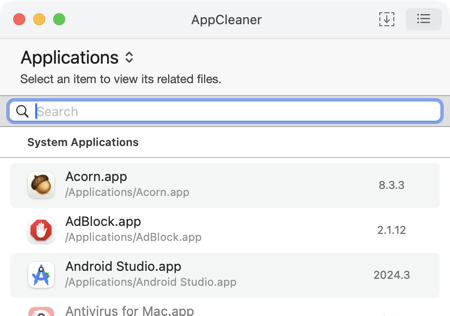
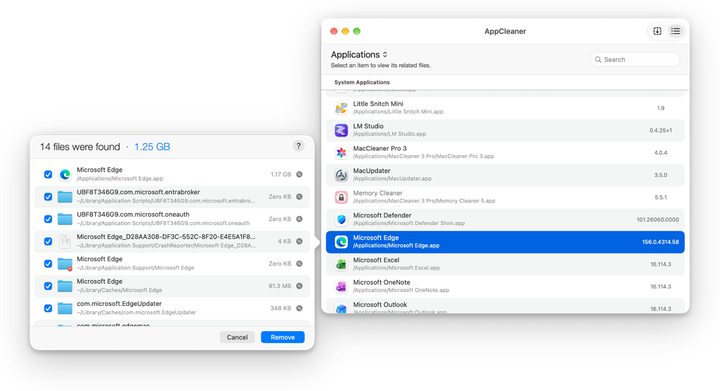
AppCleaner is an old-school free uninstaller that does one job: you drag an app onto its window, or pick it from a searchable list, review the app files in a preview window, and delete.
- SmartDelete’s daily-use advantage is that it watches the Trash and asks to remove an app’s files the moment you drag the app there, with no need to open AppCleaner first.
- Unlike Pearcleaner, it runs on old hardware too, since FreeMacSoft keeps older builds for macOS versions back to OS X 10.10 Yosemite.
Version 3.7, released on September 22, 2026, is the first update since 3.6.8 in July 2023. It added macOS 27 Golden Gate support, a Full Disk Access prompt, and better detection of files in Application Scripts.
In 3.7, I noticed a few things. The list view has a search field, and selecting an app opens a window with a preview of every file it’s about to delete. AppCleaner also locks apps that are still running, so you have to quit them and reopen AppCleaner before it can remove them.
- Homebrew: about 4,900 installs in the last 30 days
- Install: brew install --cask appcleaner
Also Read: AppCleaner by FreeMacSoft vs App Cleaner & Uninstaller by Nektony
Pearcleaner: Free uninstaller rich in features
Price: Free
Compatibility: macOS 13 Ventura to macOS 26 Tahoe
Safety: Apple-notarized
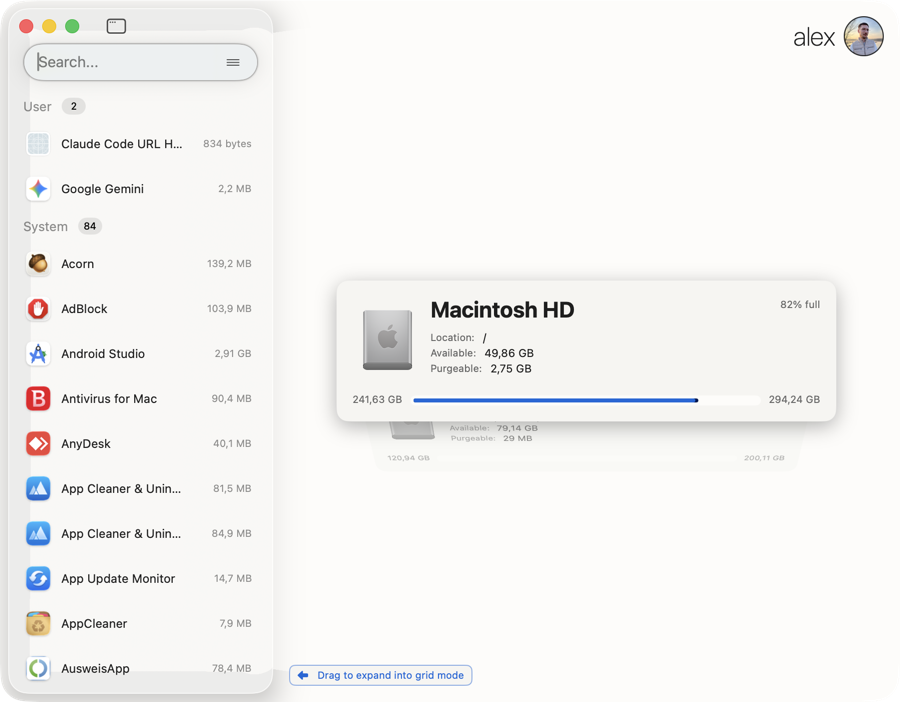
Pearcleaner is a free app uninstaller that does more than remove apps. It also searches for orphaned files, cleans Homebrew packages, manages plugins and services, checks for app updates, and strips unused architectures from universal apps with App Lipo.
On my Mac, the main list appeared the moment I opened it. I also saw the following modules:
- App Uninstall and Orphaned File Search
- Homebrew Manager, PKG Manager, and Development Environment Manager
- Plugin Manager and Services Manager
- Apps Updater
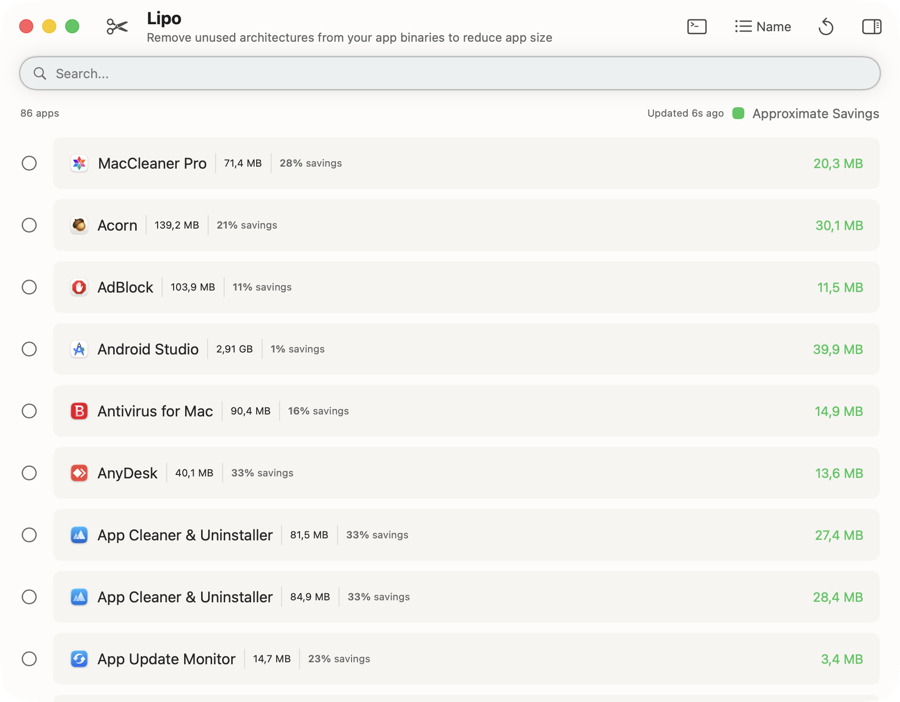
- App Lipo, which strips unused architectures from universal apps, for example, the Intel code inside an app on an Apple Silicon Mac
- Sentinel Monitor, a background process (about 2 MB of RAM) that asks to clean up when an app lands in the Trash
- Finder extension for right-click uninstall and command-line support
- GitHub: about 14,000-15,000 stars and 375 forks
- Homebrew: 45,227 installs in the last 365 days
- Install: brew install --cask pearcleaner
Also Read: Pearcleaner vs App Cleaner & Uninstaller
Test results: leftover detection, batch removal, and speed
| App | Pearcleaner: leftovers / total | AppCleaner: leftovers / total | What I saw |
|---|---|---|---|
| BBEdit (regular app) | 3.1 MB / 71.8 MB | 4.2 MB / 75.1 MB | AppCleaner found a bit more |
| Pages (sandboxed, App Store) | 28.3 MB / 901.4 MB | 28.1 MB / 637.1 MB | Pearcleaner’s larger total includes false positives |
| OneDrive (helper and launch agent) | 5.42 GB / 6.67 GB | ~51.2 MB / 1.3 GB | Only Pearcleaner found ~/Library/Group Containers/UBF8T346G9.OneDriveStandaloneSuite |
| IINA (video player) | 7.7 MB / 171.8 MB | 7.7 MB / 171.8 MB | Identical results |
* Leftovers = files outside the app bundle; total = app bundle plus leftovers.
Leftover detection
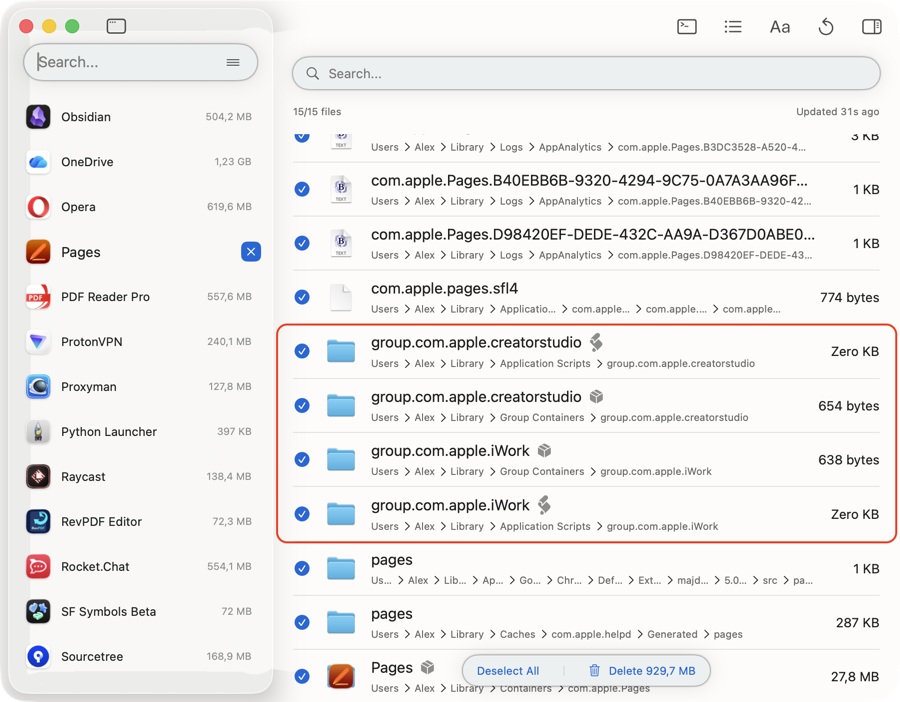
On simple apps, the two tools came out even. The gap opened on OneDrive: Pearcleaner found more than 5 GB of leftovers, AppCleaner about 51 MB, because only Pearcleaner reached the shared Microsoft folder in Group Containers. Pearcleaner’s wider net also catches the wrong files.
On Pages, it added items that belong to other apps, and GitHub users report the same pattern: removing Firefox flagged Thunderbird files, and removing Teams flagged Word, Excel, and PowerPoint files.
So, compared to AppCleaner’s results, Pearcleaner’s lists need a closer look before you click Remove.
Batch removal
| Criterion | Pearcleaner | AppCleaner |
|---|---|---|
| Remove several apps at once | 𐄂 No multi-select in the main list | ✓ Yes, Command-click or Shift-click |
| Picking apps | ! List; drag-and-drop didn’t work | ✓ List or drag-and-drop |
| Time to remove all four apps | One at a time | About 3 seconds |
Unlike Pearcleaner, AppCleaner lets you select several apps with Command-click or Shift-click and remove them together. It cleared all four test apps in about 3 seconds. Pearcleaner removes one app at a time from its list, and its drag-and-drop area didn’t respond in my test.
Speed
Both tools list your installed apps right away. Select one, and each takes another second or two to finish scanning for related files, so speed won’t decide this matchup.
macOS support and maintenance status in 2026
| Date | Pearcleaner | AppCleaner |
|---|---|---|
| July 2023 | 3.6.8 | |
| July 2024 | 3.7.7: signed and notarized | |
| November 2025 | 5.4.3: last release | |
| End of 2025 | Development on hold | |
| September 2026 | Issue “Can’t use on macOS 27” open, no reply | 3.7: Golden Gate support |
Pearcleaner. Most reviews still describe Pearcleaner as the tool under active development. Its own README now carries a “Project Status: On Hold” notice: development “has basically stopped since the end of 2025,” and the developer has paused issue replies, features, and releases with no end date. The developer adds that the project isn’t abandoned.
The last Pearcleaner release, 5.4.3, came out on November 26, 2025. You can see the cost of that pause in two open reports: “Can’t use on macOS 27” and a missing Homebrew app list on some Macs, both without a reply from the maintainer at the time of my check. So, users depend on outside pull requests. And there weren’t any when I checked.
AppCleaner. AppCleaner moved the other way. After a three-year gap, version 3.7 arrived in time for macOS 27. It runs on macOS 15 and later, while older Macs keep version 3.6.8 or earlier builds. It also adds a Full Disk Access prompt. The project has been released twice in four years, so don’t expect a fast schedule, but it’s one of the two with a 2026 release.
Permissions both tools need, and why removal fails without them
Both uninstallers need Full Disk Access in System Settings → Privacy & Security. Without it, macOS hides Containers, Group Containers, and parts of the system Library from them, and the scan comes back short with no warning. AppCleaner 3.7 now asks for this permission at launch.
On recent macOS versions, uninstallers also need App Management, which Apple describes as “Allow apps to update or delete other apps on your Mac.” Without it, macOS blocks the removal, saying the app “was prevented from modifying apps on your Mac.”
Pearcleaner goes one step further and installs a privileged helper to work in system folders, so it asks for your admin password. Its Sentinel monitor may also need Accessibility access, and AppCleaner’s SmartDelete may ask for the same.


Troubleshooting:
- Pearcleaner lost Full Disk Access after a Homebrew update. macOS treats the copy with the new signature as another app. Remove its entry with the minus button in Full Disk Access and Accessibility, then add it again with the plus button.
- AppCleaner fails to move files to the Trash. Empty the Trash and run the removal again.
Download safety: official sources and fake Pearcleaner sites
Pearcleaner carries a risk AppCleaner doesn’t: impostor sites. A fake Pearcleaner page told visitors to paste a command into Terminal, which downloaded an obfuscated script with AMOS (Atomic Stealer) behavior. At the time of the report, 12 of 92 engines on VirusTotal flagged it. The developer says the only website he owns is itsalin.com.
Get each tool only from official sources:
- Pearcleaner: github.com/alienator88/Pearcleaner, itsalin.com, or brew install --cask pearcleaner
- AppCleaner: freemacsoft.net/appcleaner or brew install --cask appcleaner
Apple notarized both apps, so Gatekeeper checks them for known malware on first launch, but it can’t protect you from a command you paste into Terminal yourself. Download portals that repack freeware for Mac have a history of bundled adware; I found no such case with AppCleaner, but the official site is the safer bet for both tools.
Where both free uninstallers stop
- System apps: neither tool removes Safari, Mail, or other apps protected by SIP. AppCleaner lists a system app’s files but keeps the delete button disabled.
- No removal history: once you empty the Trash, a wrong deletion means restoring from Time Machine.
- No support: both uninstallers are free projects, and Pearcleaner’s issue tracker is on hold.
- Old leftovers: AppCleaner can’t find files of apps deleted before you installed it. Pearcleaner’s orphaned file search lists unclaimed files without grouping them by the app, and the developer closed a request to track apps removed before you install Pearcleaner.
- No wider app management: neither has a maintained updater (Pearcleaner’s is part of a paused project, AppCleaner has none) or network control.
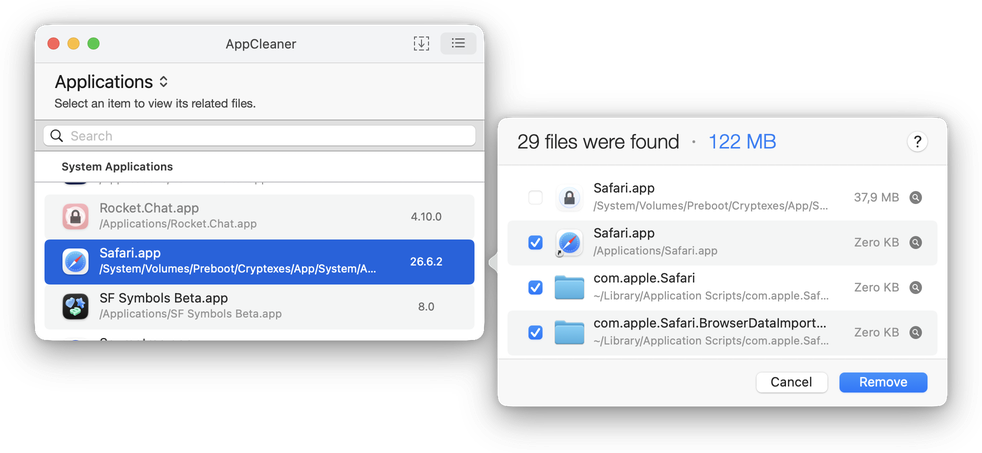
App Cleaner & Uninstaller fills these gaps
If you need what the free tools skip, App Cleaner & Uninstaller by Nektony is a paid alternative under active development:
- In-app updates for App Store and non-App Store apps
- A database of more than 20,000 apps, grown with each release
- A Remains list that groups leftovers of apps you already deleted by app name
- Removal History, so you can restore files removed by mistake
- Network Access to block any app from the internet
- Deep uninstallation, batch removal, app resets
- A support team you can email
It costs $7.95 a month, $14.95 a year, or $34.95 once, with a 2-day full trial.


Also Read: How to delete remains of already removed apps
Final pick
- Choose AppCleaner if you want one simple action, batch removal, or a tool that runs on both Golden Gate and older Macs.
- Choose Pearcleaner if you’re on macOS 13 to 26, want the deepest scan and extra cleanup tools, and don’t mind checking each file list.
- Consider the paid App Cleaner & Uninstaller if you need extra features like updates and per-app internet blocking, removal history with restore option, support you can contact, or confidence that the tool will work on the next macOS.
Frequently asked questions
Which tool is better at uninstalling apps, Pearcleaner or AppCleaner?
Pearcleaner found more in my test, including a Group Containers folder for OneDrive that AppCleaner missed. But Pearcleaner also flagged files from other apps on Pages, so review its list before removing. AppCleaner, by contrast, found fewer files and no false positives, so its lists need less checking.
Is AppCleaner the same as App Cleaner & Uninstaller?
No, AppCleaner is free software from FreeMacSoft, and App Cleaner & Uninstaller is a paid app from Nektony with a wider feature set, including leftover cleanup for deleted apps, app updates, and a removal history.
Can I use both AppCleaner and Pearcleaner?
Yes, they don’t conflict. So, you can use AppCleaner for quick batch removals and Pearcleaner for Homebrew cleanup or a deeper scan. Turn on only one Trash monitor, SmartDelete or Sentinel, so you don’t get two prompts for the same app.